Becoming digitally enabled in Saudi Arabia now begins before you travel. Under the updated process you first register with the Saudi Ministry of Foreign Affairs and give your biometric data — fingerprints and a photo — at the Saudi embassy or consulate in your own country. Once that is done, the remaining steps are completed in the Kingdom: a local SIM, your Border Number, your Visitor Digital ID, Nafath and a Saudi bank account. This guide walks through all six steps in the exact order to do them.
The six steps, in order
- Before you travel: register with the Saudi Ministry of Foreign Affairs and book an embassy appointment for biometrics (fingerprints & photo).
- Buy a local Saudi SIM card.
- Retrieve your Border Number.
- Issue and activate your Visitor Digital ID in the Absher app.
- Register on the Nafath app for secure sign-ins.
- Open a Saudi bank account.
Step A: Register with the Saudi Ministry of Foreign Affairs & give your biometrics
The digital-readiness process now begins before you travel. Under the updated procedure, applicants must first register with the Saudi Ministry of Foreign Affairs (MOFA) and book an appointment at the Saudi embassy or consulate serving their country to have their biometric data collected — fingerprints and a photograph. This biometric enrolment underpins the identity checks used across every later stage, so it must be completed first.
Official Saudi Ministry of Foreign Affairs portal · verify.mofa.gov.sa · opens in a new tab · book at the Saudi embassy in your country of residence
- Open the MOFA verification portal and choose the relevant service card.
- Create your registration and complete your details.
- Book an appointment at the Saudi embassy or consulate for your country (see the directory below).
- Attend in person on your appointment date to give your fingerprints and photo — take your passport.
Once your biometrics are captured, you can travel to Saudi Arabia and continue with the in-Kingdom steps below.
Haramain Properties tip
Book your embassy appointment well ahead of your travel dates. Availability varies by country and slots fill quickly during Hajj and Umrah seasons, so securing this early keeps the rest of your timeline on track.
Saudi embassies & consulates: popular countries
Book your biometric appointment at the Saudi mission that serves your country of residence. Addresses are listed for reference — always confirm the current address, opening hours and appointment procedure on the official MOFA portal or the embassy’s own website before travelling, as consular sections and procedures can change.
🇬🇧 United Kingdom
Royal Embassy of Saudi Arabia
30 Charles Street, Mayfair, London W1J 5DZ, United Kingdom
🇺🇸 United States
Royal Embassy of Saudi Arabia
601 New Hampshire Avenue NW, Washington, DC 20037, USA
🇮🇳 India
Royal Embassy of Saudi Arabia
Chandragupta Marg, Chanakyapuri, New Delhi 110021, India
🇿🇦 South Africa
Royal Embassy of Saudi Arabia
711 Jan Shoba Street, Hatfield, Pretoria 0028, South Africa
🇲🇾 Malaysia
Royal Embassy of Saudi Arabia
Level 4, Wisma Chinese Chamber, 258 Jalan Ampang, 50450 Kuala Lumpur, Malaysia
🇧🇩 Bangladesh
Royal Embassy of Saudi Arabia
House 5, Road 83, Gulshan-2, Dhaka 1212, Bangladesh
🇪🇸 Spain
Royal Embassy of Saudi Arabia
Calle del Doctor Álvarez Sierra 3, 28002 Madrid, Spain
🇷🇺 Russia
Royal Embassy of Saudi Arabia
3rd Neopalimovsky Pereulok 3, 119121 Moscow, Russia
🇮🇹 Italy
Royal Embassy of Saudi Arabia
Via Giovanni Battista Pergolesi 9, 00198 Rome, Italy
Step B: Buy a Saudi SIM card
Visit a branch or kiosk of Mobily, STC or Zain (all present at the airports and throughout Makkah and Madinah). You will need to show your passport and valid tourist visa. Your Saudi mobile number is used for SMS verification throughout the Digital ID and banking registration processes, so this comes first.
Step C: Retrieve your Border Number
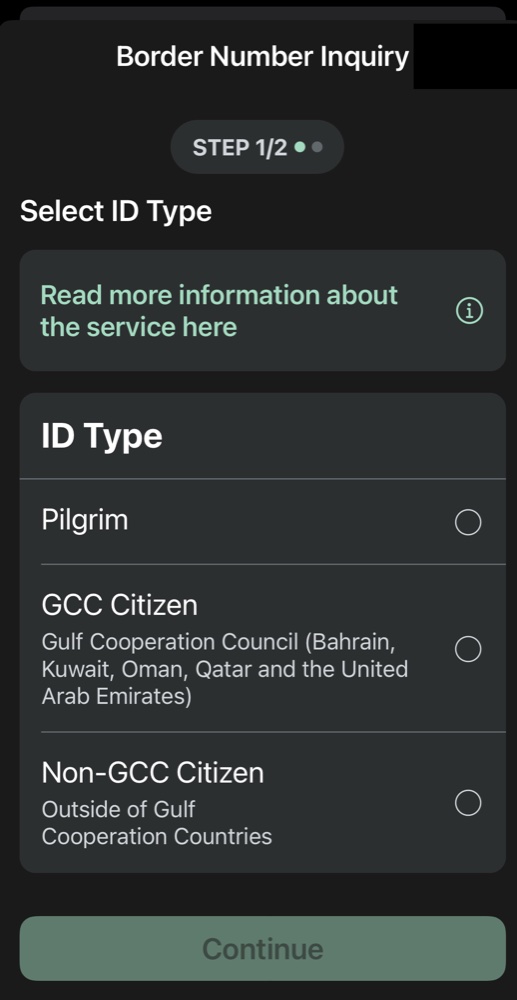
Your Border Number is a unique visitor reference issued when you enter Saudi Arabia, and it is required for Digital ID registration. Retrieve it using the official Absher public enquiry service:
Official Saudi government service · absher.sa · opens in a new tab · no login needed
- Select your ID type (most international visitors choose Non-GCC Citizen; pilgrims on Hajj or Umrah visas select Pilgrim), then continue.
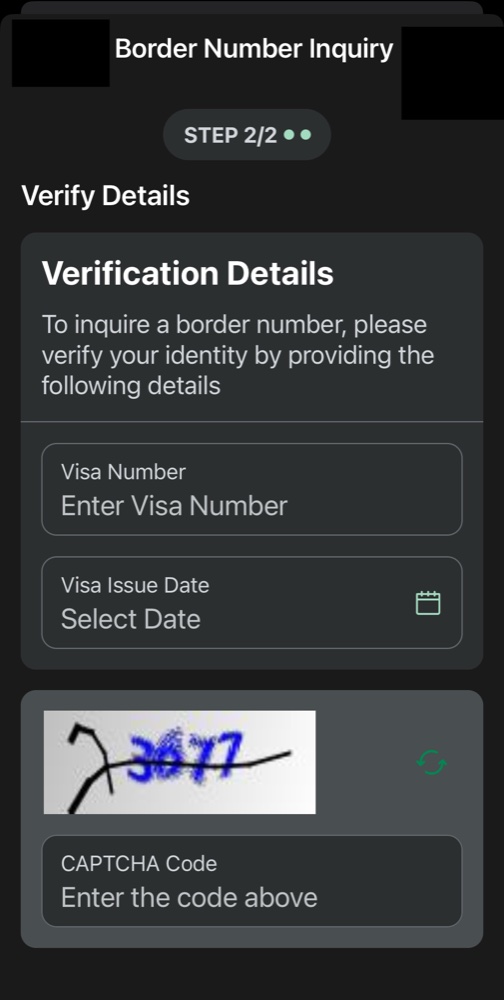
- Verify your visa details: enter your visa number and visa issue date.
- Complete the CAPTCHA check.
- Your Border Number appears on the next screen. Note it down before you exit.
Haramain Properties tip
Save a screenshot of your Border Number. You will need it for several government and banking services, and it also becomes your Digital ID number once your Visitor Digital ID is activated.
Step D: Issue and activate your Visitor Digital ID (Absher)
With your Border Number and Saudi mobile number ready, download the official Absher app, published by the Saudi Ministry of Interior, from the official Absher site, the Apple App Store or Google Play.
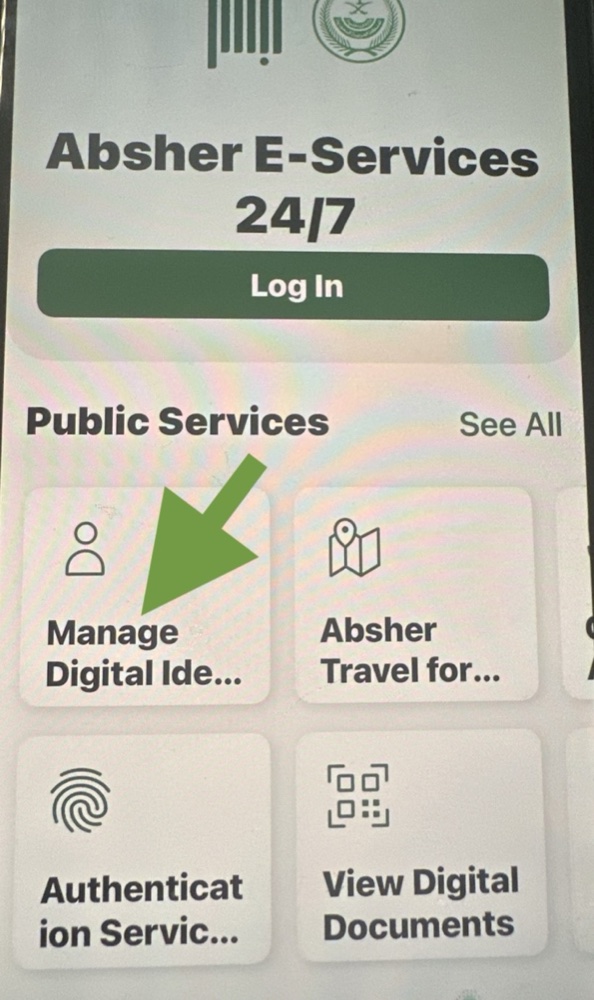
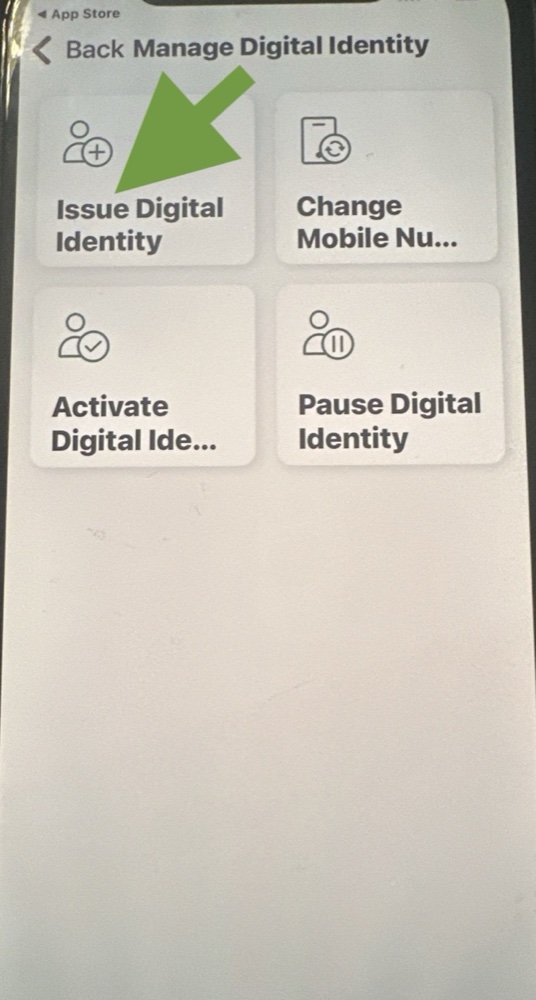
Important: do not log in. From the app home screen, go straight to:
Public Services → Manage Digital Identity → Issue Digital Identity
Complete the registration form with:
- Border Number (mandatory)
- Saudi mobile number (mandatory)
- Email address, username and password
After registering, return to Manage Digital Identity → Activate Digital Identity. Activation is done in person at an Absher self-service kiosk or a government-authorised office (kiosks are available in Makkah, Madinah and the airports). Take your passport, your Saudi mobile phone and your Border Number. Depending on current requirements this may involve authentication at the kiosk or another approved identity verification method.
Once activated, restart the app and log in: your Visitor Digital ID card appears inside Absher.
Step E: Register on Nafath
Nafath is the Kingdom’s secure single sign-on platform. It verifies your identity for government services such as the Saudi Properties portal and for private-sector apps such as banking, using biometric authentication instead of passwords. Verification uses three elements: a random two-digit number, your PIN, and photo recognition.
Download the official Nafath app and follow the registration process using your newly activated Digital ID.
Step F: Open a Saudi bank account
With your Digital ID activated and Nafath registered, eligible visitors can apply for a visitor bank account with participating Saudi banks, subject to each bank’s onboarding and compliance requirements. You will need:
- Activated Visitor Digital ID
- Valid passport
- Active Saudi mobile number
- Nafath registration
Participating banks currently include Riyad Bank, Saudi National Bank (SNB), Al Rajhi Bank and Arab National Bank. Download each bank’s official app from its website, the App Store or Google Play.
Stage 1 outcomes
- ✓Registered with MOFA and completed embassy biometrics (fingerprints & photo)
- ✓Entered Saudi Arabia on a tourist visa
- ✓Saudi mobile number active
- ✓Visitor Digital ID issued and activated on Absher
- ✓Nafath registered
- ✓Saudi bank account opened (subject to approval)
- ✓Ready to search for eligible property on the Saudi Properties portal
Haramain Properties tip
Think of your Visitor Digital ID number and your Saudi mobile number as your two key digital credentials in Saudi Arabia. Keep the mobile number active throughout your visit, because it receives the security verification codes for everything that follows.
What next
With Stage 1 complete you are digitally ready to search for eligible property. Explore the approved zones and current listings, or register your interest and we will keep you informed as opportunities go live.
Screens and requirements are those of the official services at the time of writing and may change. This guide is general information based on official Saudi government publications and our practical experience of the systems, not legal advice.